
kubit-update
Updates the Kubit plugin to the latest version. Checks npm, shows you what changed, asks for confirmation, and runs the installer.
What it does
kubit-update keeps your local Kubit plugin in sync with npm. It reads your installed version, fetches the latest, previews the changelog, and runs a clean install of the shipped skills after you confirm.
No session required — works any time, even when other skills are failing.
Prerequisites
Network access to npm.
The runtime that originally installed the plugin (Claude Code or Cursor) still available.
Usage
❯
/kubit-update
No flags needed.
Examples
Check for an update
❯
/kubit-update
You'll see one of three outcomes:
Update available → changelog preview + confirmation prompt.
Already on latest → one-liner, nothing happens.
Ahead of latest → warning (looks like a dev or pre-release install), no downgrade.
Example output
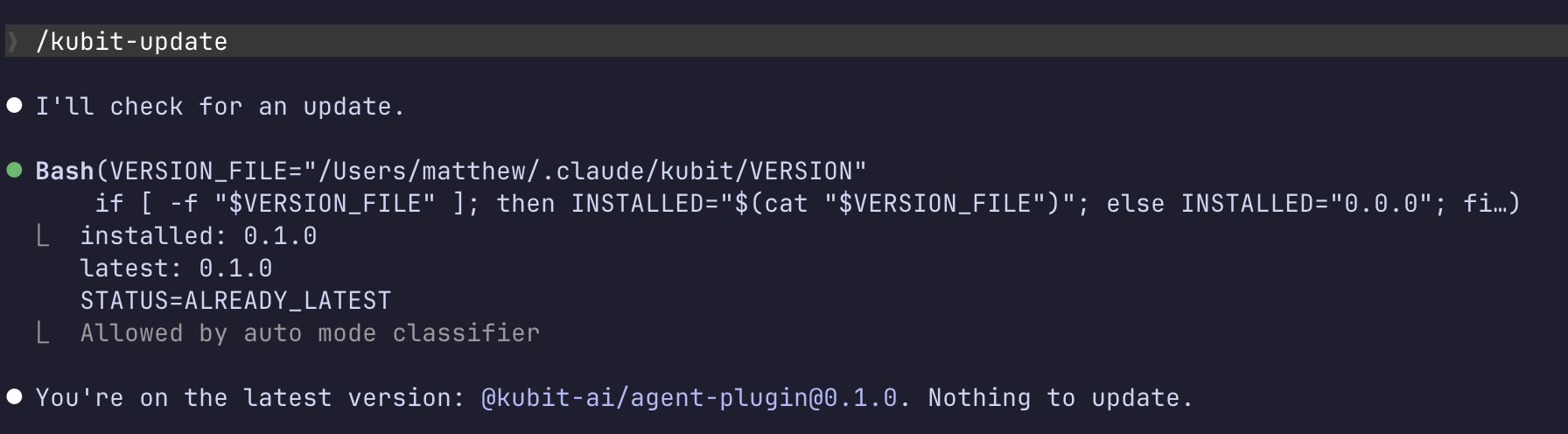
What you'll see before confirming
When an update is available, the preview shows:
Version diff (current → new).
Changelog slice between your version and latest.
Exact paths that will be wiped and re-extracted.
What's preserved vs. overwritten.
The clean install is destructive by design, so confirmation is non-skippable.
What it won't do
Run without your explicit confirmation.
Update offline — stops cleanly if npm is unreachable.
Merge or patch in place — always a full re-extract.
Downgrade you if your installed version is ahead of npm's latest.
Back up your edits to shipped skills (see Notes).
Notes
Custom edits to shipped Kubit Skills will be overwritten. Copy them out before confirming if you've modified anything under
$CONFIG_DIR/skills/kubit-*.Your other skills won't be impacted — anything else you've added under
$CONFIG_DIR/skills/is left alone.
Restart your runtime (Claude Code or Cursor) after a successful update to pick up the new skills.