
kubit-blame
Git blame for agents. Given a problematic trace, error cluster, or metric regression, kubit-blame finds the recent commit(s) most likely responsible.
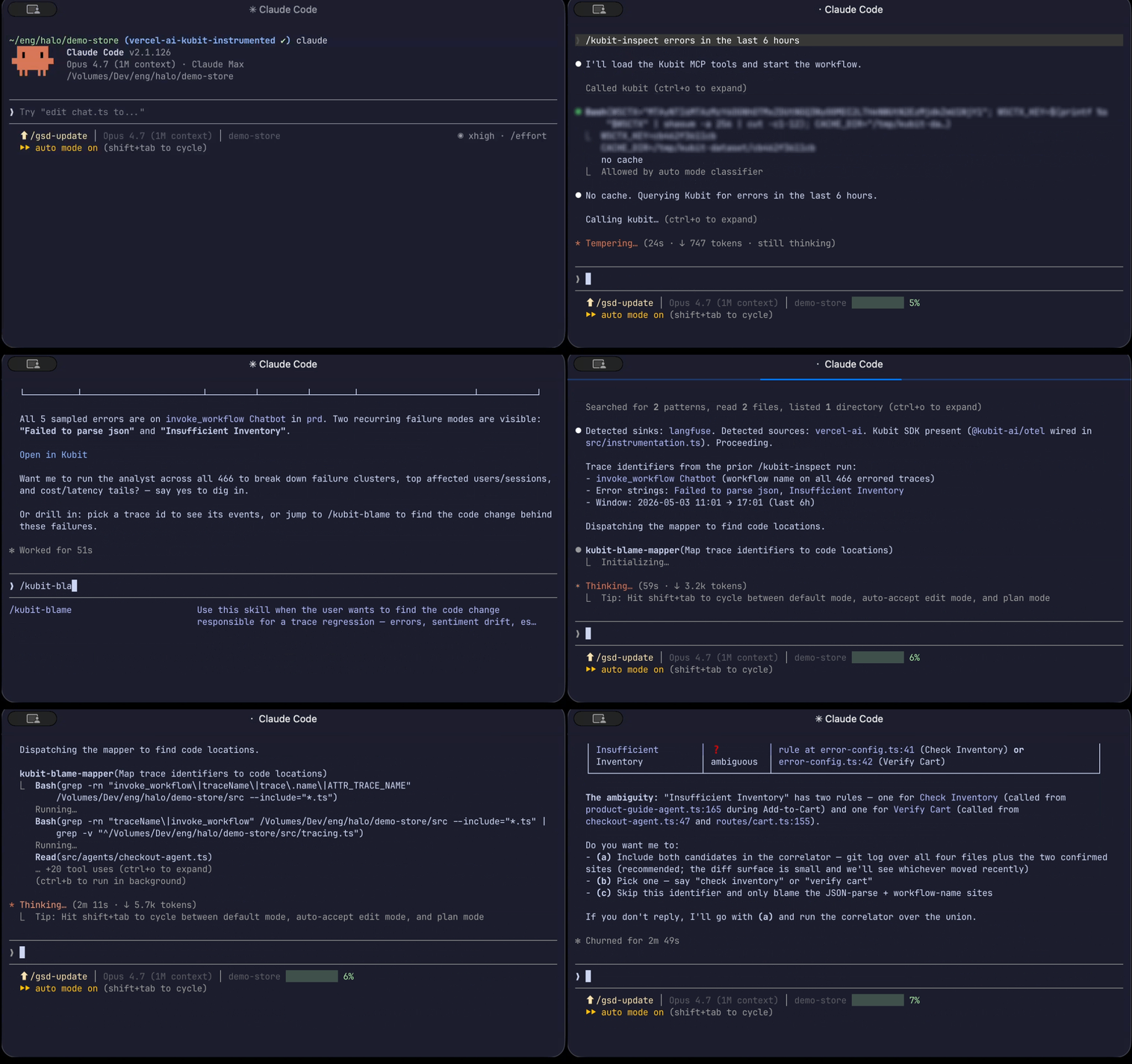
What it does
kubit-blame connects observability data to source control. You point it at something that's broken or regressed, and it:
Maps the trace identifiers (agent names, tool names, prompts) to concrete code locations in your repo.
Confirms any ambiguous mappings with you before proceeding.
Runs
git logover those locations within the relevant time window.Ranks suspect commits by temporal proximity, coverage, and diff surface — each with a short summary of what behaviorally changed.
The output is a ranked list of likely culprits, not a single answer. You stay in the loop for every ambiguous decision.
Looking for the regression itself? Use kubit-report (trends) or kubit-inspect (specific failures) to find what broke. kubit-blame then tells you which commit broke it.
Prerequisites
A connected workspace (
kubit-connect).An LLM tracing framework set up in your repo. If none is detected,
kubit-blamewill tell you which frameworks are currently supported and exit cleanly.The skill must be run from inside the application repo whose code you want blamed — it needs
githistory to correlate against.
Usage
❯
/kubit-blame<natural language>
No flags. Describe what you want investigated — a metric regression, a specific failing trace, or a cluster of errors — and kubit-blame works backward from there.
Examples
Investigate a metric regression
❯
/kubit-blamethe checkout escalation spike from last week
Typical flow
Trace identifiers are extracted from the report context.
Each identifier is mapped to a code location. Anything ambiguous (e.g. two agents share a name) is surfaced for you to disambiguate.
Commits touching the mapped locations during the spike window are ranked.
You see a top suspect with SHA, author, date, commit message, touched files, a behavioral summary of the change, and the score breakdown.
When the top suspect is significantly stronger than the rest, the output leads with "Most likely cause: #1." Otherwise it stays neutral and lets you compare.
Investigate a specific failing trace
❯
/kubit-blamewhy did trace 2f7a1e2 fail — what changed?
The mapper identifies which agent and tools were involved in the trace, you confirm the mapping, and the correlator returns the commits that touched those locations recently.
Follow up from a report or inspection
❯
/kubit-blamefind the commit behind the sentiment drop in the report I just ran
When kubit-report or kubit-inspect surfaces errors or regressions, they'll suggest running kubit-blame as a follow-up. You can pass that context directly — no need to re-paste trace IDs.
Drill into a specific commit
After results render, you can keep going:
❯ show me the diff for 7f3a1c2
❯ re-run with a 14-day window instead
❯ inspect the failing traces side by side
The last one hands off to kubit-inspect automatically.
Output format
Results come back in three blocks:
Block | Contents |
|---|---|
Resolved context | Framework detected, count of mapped locations, time window |
Ranked suspects | Top 5 by default — SHA, date, author, message, touched paths, behavioral summary, score breakdown |
Next actions | Drill into a SHA, inspect traces, widen the window, or watch the metric over time |
Special cases
Weak correlation across the board. The list is capped at 3 and the output leads with: "No strong code suspect. This may be data drift or a model-side change, not a code regression."
No commits in the mapped locations. The suspect list is omitted and you're prompted to widen the window or revisit the mapping.
What it won't do
Fetch metrics or traces. That's
kubit-reportandkubit-inspect's job —kubit-blameworks from data those skills produce.Silently guess at ambiguous mappings. If a trace identifier could match multiple code locations, you'll always be asked to pick.
Fall back to filesystem timestamps when git history is unavailable. If the repo isn't a git checkout (or is a shallow clone), you'll be told explicitly and offered a fix.
Notes
If your tracing framework isn't supported yet, you'll see a clear message — Get Support and adapter support is being added incrementally.
Shallow clones are detected and warned about; running
git fetch --unshallowand re-dispatching usually resolves it.If the trace set is too large to map efficiently, you'll be asked to narrow it (fewer traces, a specific agent, a tighter window) before proceeding.