
kubit-integrate
The "turn on Kubit ingestion" command. Run it once in your application repo and your existing LLM traces start flowing into Kubit.
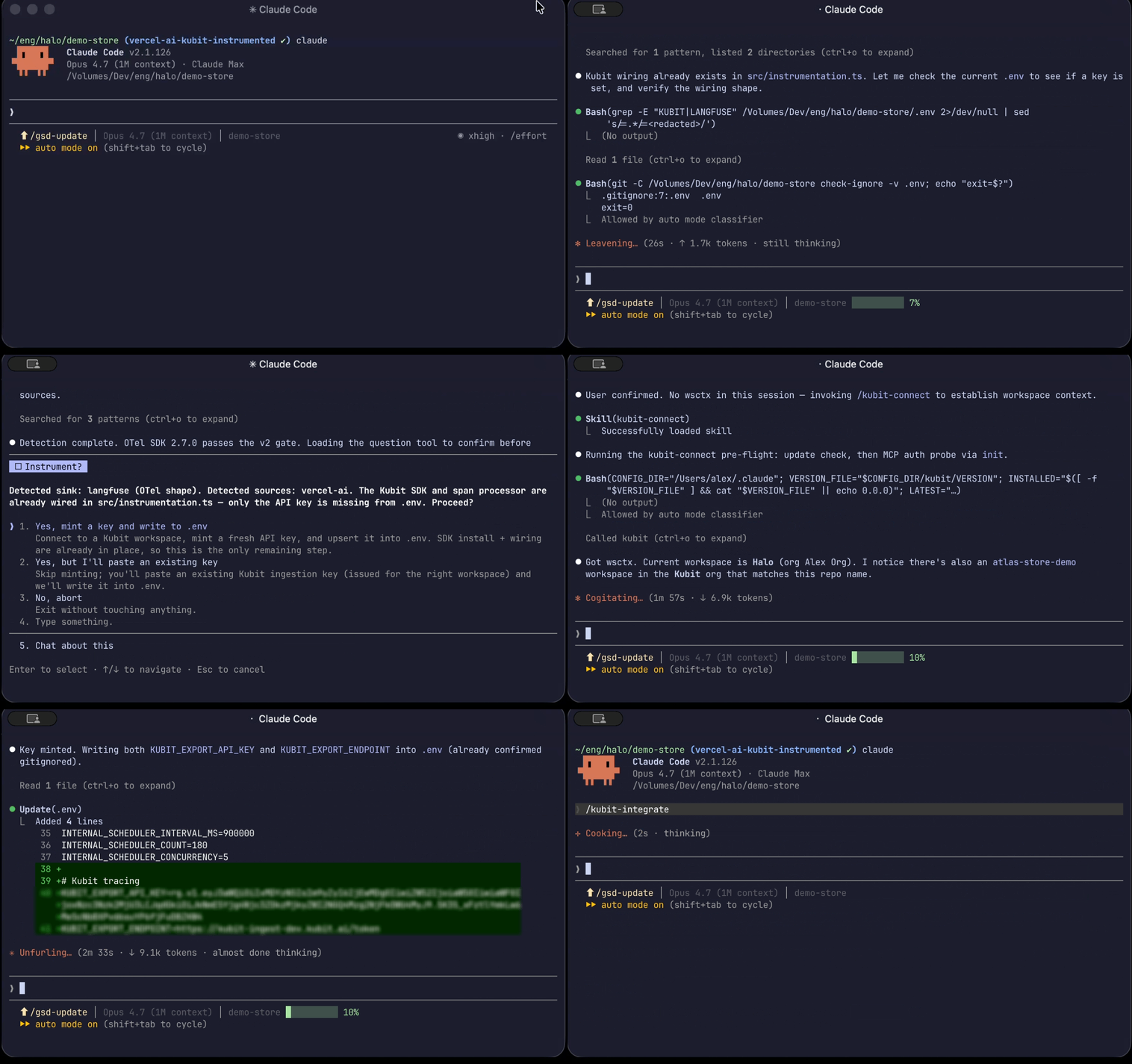
What it does
kubit-integrate is the end-to-end onboarding flow. In a single run, it will config your project to send LLM traces to Kubit through OpenTelemetry instrumentation:
Detect your tracing setup in the current repo, including AI Framework (e.g. Langchain, Vercel AI) and Observability SDK (Langfuse, Braintrust, Arize or Langsmith).
Ensure a Kubit session (delegating to
kubit-connectif you don't have one).Pick a workspace — use your current one, switch to another in your org, or create a new one.
Mint an ingestion API key scoped to that workspace.
Write the key into your repo's
.env.localor.env(gitignore-checked).Install the Kubit SDK via your project's package manager.
Wire Kubit's span processor into your existing tracing setup — merging into your existing wiring file when one exists, or scaffolding a standalone bootstrap file when none does.
Your existing tracing setup won't be impacted since Kubit's span processor will work in parallel through OTel fan-out.
After it finishes, you run a single verification command (printed at the end) and traces should appear in Kubit once you app starts running.
Already integrated and just need to switch contexts? Use
kubit-connect.kubit-integrateis for first-time setup, not session management.
Prerequisites
You're running the command from inside the application repo you want to instrument (not a parent directory, not a fresh checkout).
Your repo already has a supported LLM tracing framework wired up. If none is detected,
kubit-integratewill tell you which frameworks are currently supported and exit cleanly without touching anything.For Node/TypeScript projects: OpenTelemetry SDK v2.x or higher. If you're on v1, you'll be asked to upgrade before re-running.
Usage
❯
/kubit-integrate
No flags. Everything is inferred from your current working directory plus a few interactive prompts (workspace name, timezone, diff approvals).
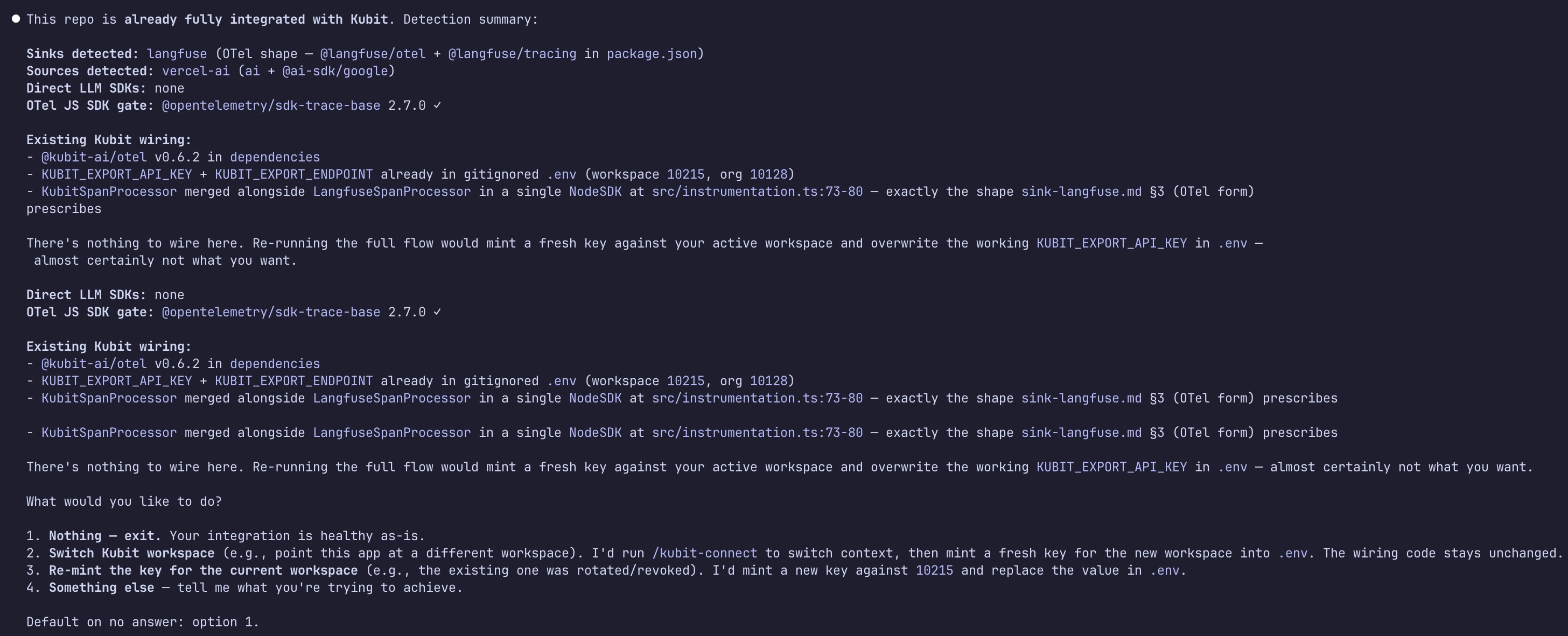
Below is the output of running kubit-integrate
What you'll be asked
The flow is mostly automated, but pauses for you on the decisions that matter:
Prompt | When |
|---|---|
Confirm framework detection | After the repo scan, before any writes. |
Pick a workspace | After your session is established — use current, switch, or create new. |
Workspace name + timezone | Only on the "create new" branch. |
Approve each diff | Before any file is written, merged, or modified. |
Pick a merge target | Only when multiple existing wiring sites are found. |
You can bail out at any prompt. Nothing destructive happens before you've seen and approved a diff.
Examples
First-time setup, new workspace
❯
/kubit-integrate
Typical workflow
Tracing framework detected → confirm.
Session established via
kubit-connect.You pick "create new workspace" → enter a name (e.g.
payments-prod) and confirm the detected timezone.Key minted,
.envupdated, SDK installed via your package manager.Wiring merged into your existing OTel setup with a diff for approval.
Close-out shows the workspace name, where the key landed, where wiring went, and a verification command.
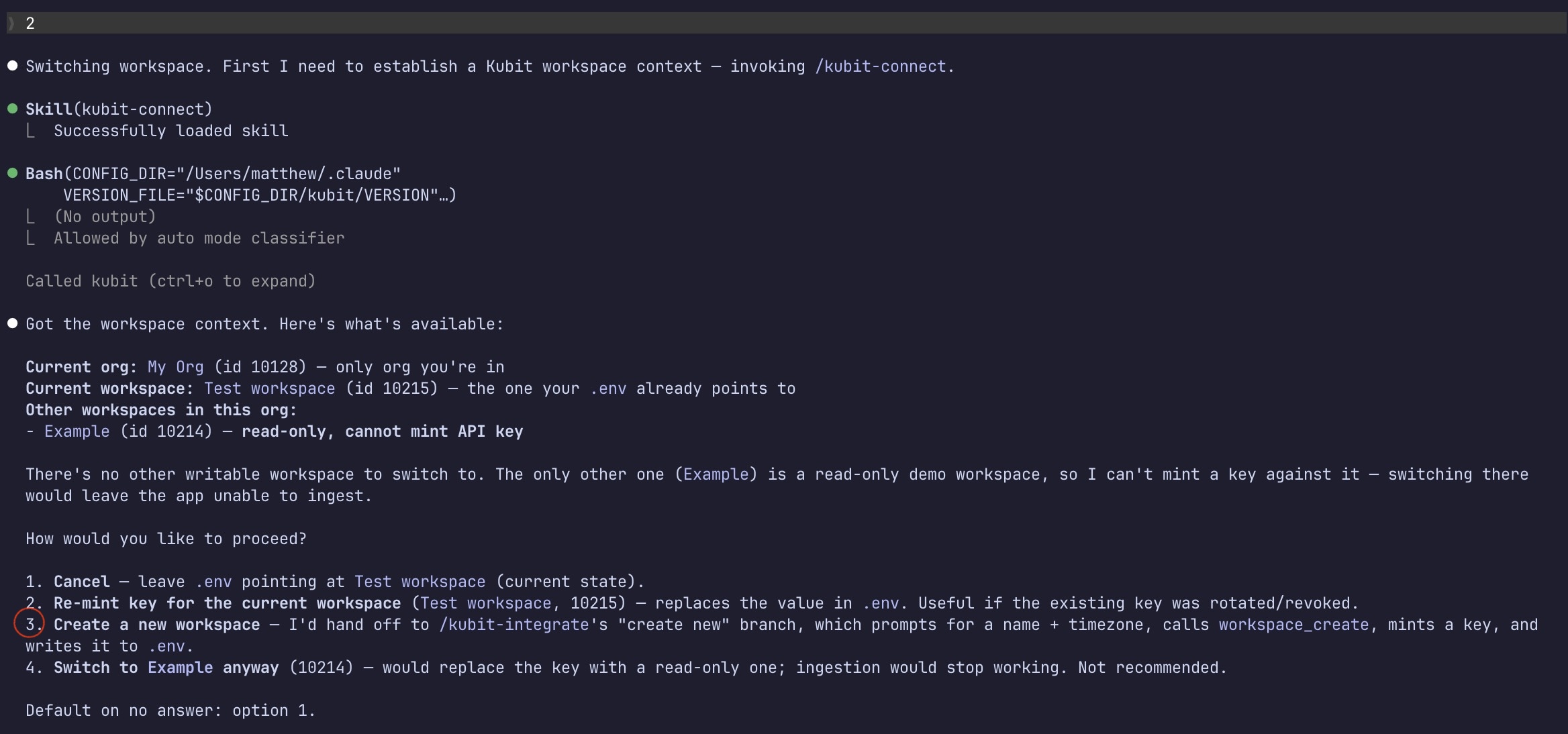
After choosing the framework and env file target, once the session is established, you can see all the options for workspaces to connect to.
Re-issue a key for an existing workspace
❯
/kubit-integrate
Same command, different workflow:
Framework detected, session established.
You pick "use current" (your
kubit-connectsession is already pinned to the right workspace).A fresh key is minted and written to
.env— replacing the previousKUBIT_EXPORT_API_KEYline in place, leaving the rest of the file untouched.SDK install + wiring proceeds as normal.
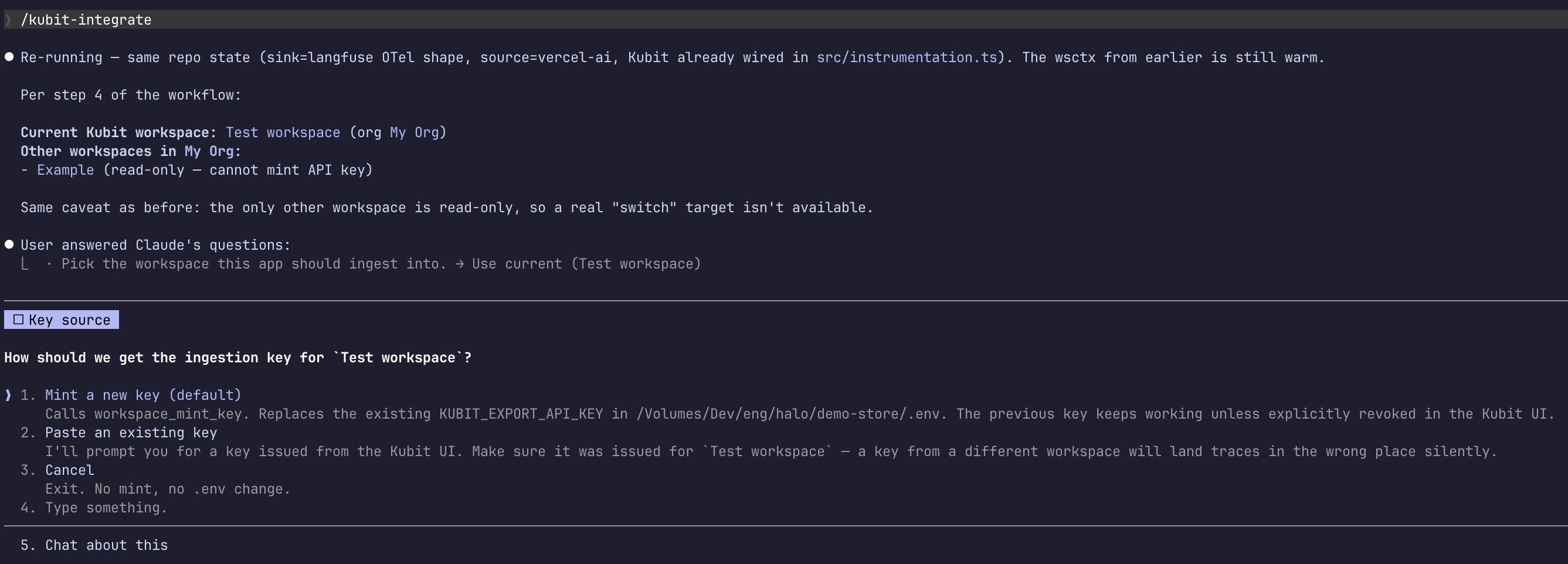
Once you choose Minting a new key, if you see the following output, means you've successfully replaced the KUBIT_EXPORT_API_KEY
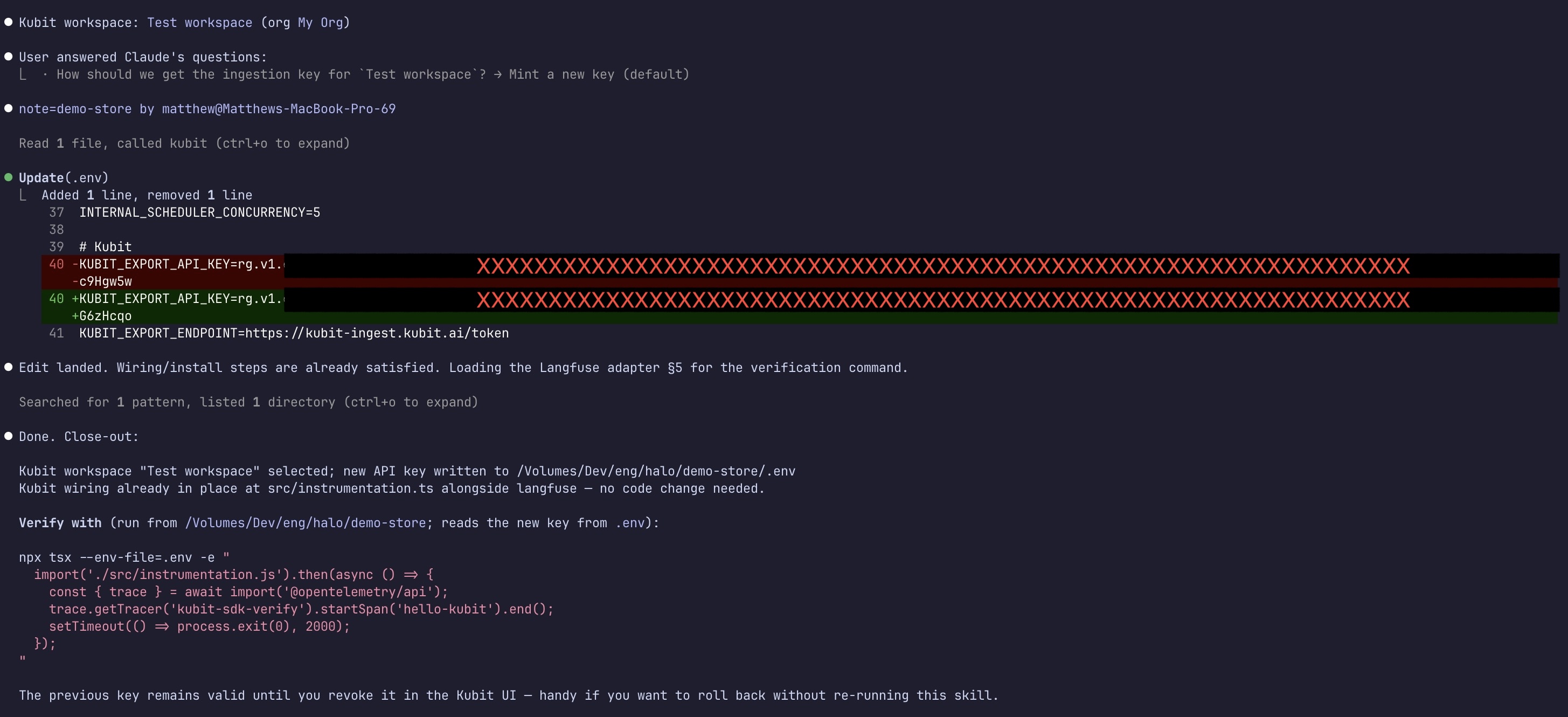
Switch to a different workspace mid-integration
If you realize you're pointing at the wrong workspace before the key is minted, pick "switch to existing" at the workspace prompt and select from the list of other workspaces in your org. The session repins, then mint and instrumentation proceed against the new workspace.
Standalone bootstrap (no existing wiring site)
If your repo uses tracing decorators but doesn't construct a TracerProvider directly, kubit-integrate falls back to scaffolding a standalone bootstrap file:
A
kubit_instrumentation.py(orkubit-instrumentation.ts) is written into the right place for your project layout — diff first, approval required.The import is added to your entrypoint (
main.py,cli.py,src/index.ts, etc.) — also diff-first.
If you decline the entrypoint edit, the wiring instruction is printed for manual paste. The bootstrap file and SDK install both stand.
Output
The close-out always prints exactly three blocks:
Status line — workspace name and where the key was written.
Wiring line — where the Kubit span processor landed (merged file path, or bootstrap + entrypoint paths).
Verification command — run this yourself to confirm traces are flowing.
For Python integrations using a standalone bootstrap, you'll also see a reminder to verify service_name, service_version, and deployment.environment before running verification — those are scaffolded as defaults and meant to be edited per environment.
What it won't do
Install your tracing framework for you. If your repo doesn't already have one set up,
/kubit-integrateexits cleanly and tells you to add it first.Write the key anywhere besides
.env.localor.env. Secret stores, CI config, and.env.productionare off-limits unless you ask explicitly.Run any verification or test span itself. The verification command is printed for you to run —
/kubit-integratenever calls Kubit's ingest endpoint from inside the skill.Silently overwrite anything. Every file write, merge, and entrypoint edit is shown as a diff first.
Echo the minted key back to you. The key lands in the env file (or, in the gitignore-fallback case, prints exactly once as a shell
exportline) and is never logged or echoed afterward.Create more than one workspace per run. The "create new" branch runs
workspace_createexactly once.
Notes
Edge runtimes: the Node SDK is Node-only (it depends on AWS Kinesis under the hood). If your repo straddles runtimes — Next.js, Cloudflare Workers, Vercel Edge, Deno — Kubit will be wired only into the Node runtime via runtime gating, never imported from Edge code.
Gitignore safety: if your
.envfile isn't gitignored, the key is not written. Instead, you'll see a one-timeexportline printed to your terminal so you can set it manually without risking a commit. Install and wiring still proceed.Failed installs: if the SDK install fails (network, resolver conflict, etc.), the manifest edit and wiring still go through so you have a diffable change. The close-out flags that verification will fail until you resolve the install manually.
Unsupported framework? Reach out on
#kubit— adapters for other frameworks are being added incrementally.