
Integrate Your App
In this article
In this article group
Instrument your application for behavior tracking with auto capture for agent actions or user behavior events through OpenTelemetry ingestion to Kubit.
For AI Agent apps, use kubit-integrate skill to complete the integration using kubit-agent SDK
For web/mobile apps, Kubit offers kubit-sentry and kubit-embrace SDKs to bridge their traces to OTel. Or you can simply config Kubit as your CDP destination.
If you already have OTel infrastructure, you can easily config the OTel integration manually.
AI Agent
Now it is time to integrate your AI agent application to send the LLM traces over to Kubit and start getting insights from Agent Analytics.
If you haven't done so yet, please
Install Kubit Plugin to Claude Code or Cursor
(Optional) Sign Up manually, or wait for OAuth to take you through the flow.
(Optional) Check out the Example workspace and Demo Store
Overview
kubit-integrate will config your project to send LLM traces to Kubit through OpenTelemetry instrumentation:
Detect your tracing setup in the current repo, including AI Framework (e.g. Langchain, Vercel AI) and Observability SDK (Langfuse, LanSmith, Braintrust or Arize).
Ensure a Kubit session (delegating to
kubit-connectif you don't have one).Pick a workspace — use your current one, switch to another in your org, or create a new workspace.
New workspace created using kubit-integrate skill will use a default Workspace Context derived from your email domain. To fine tune the Workspace Context to make enrichment more accurate, see Create Workspace
Mint an ingestion API key scoped to that workspace.
Write the key into your repo's
.env.localor.env(gitignore-checked).Install the Kubit SDK via your project's package manager.
Wire Kubit's span processor into your existing tracing setup — merging into your existing wiring file when one exists, or scaffolding a standalone bootstrap file when none does.
Your existing tracing setup won't be impacted since Kubit's span processor will work in parallel through OTel fan-out.
After it finishes, you run a single verification command (printed at the end) and traces should appear in Kubit once you app starts running.
Data Flow
LLM traces generated through instrumentation done by your existing Observability tool or our SDK will be sent to Kubit's OTel endpoint.
The traces will be ingested in near real-time and available in Agent Activity, or you can check using skills
❯
/kubit-inspecttraces in last 30 minutes
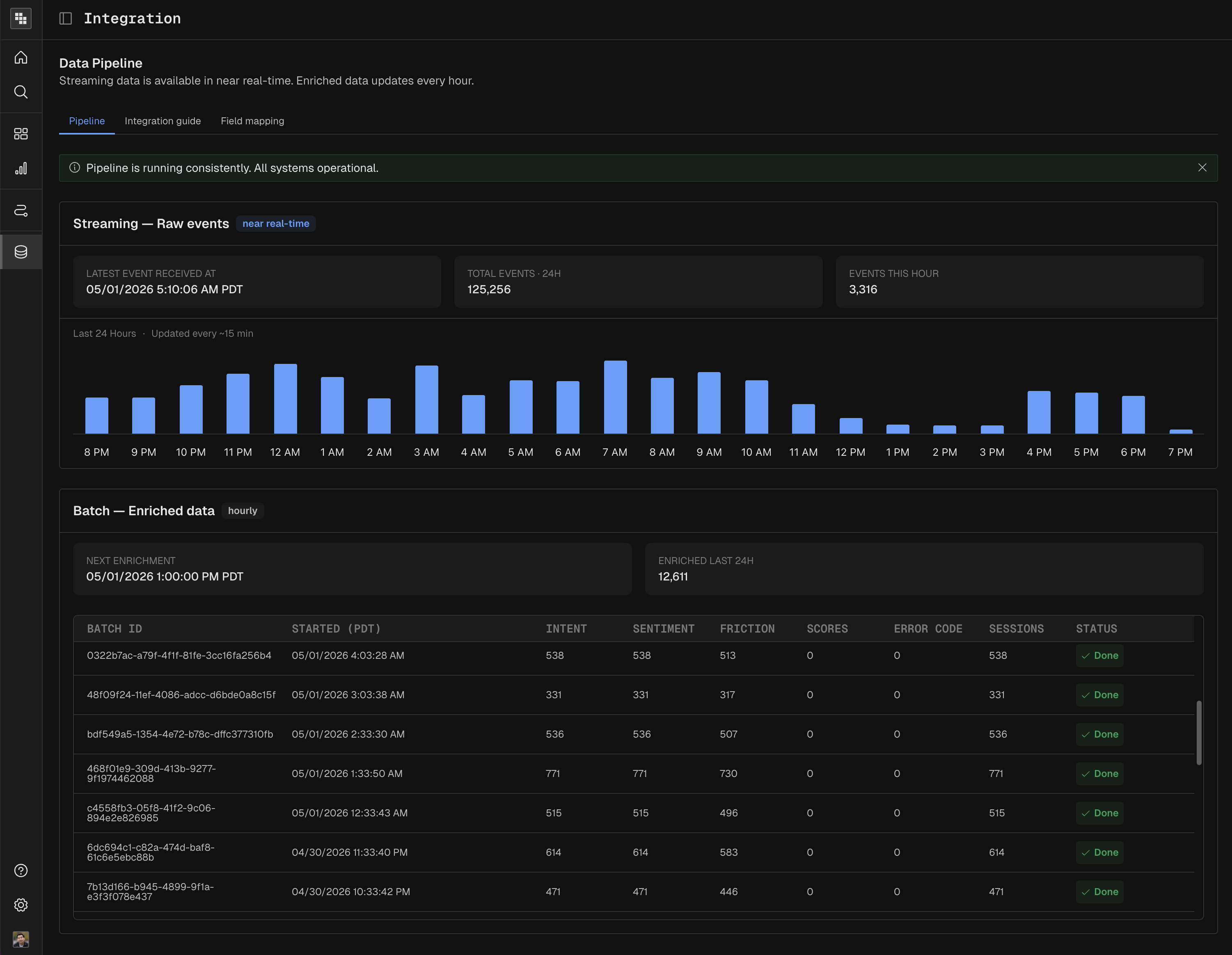
Enrichment batch job will run periodically to extract intent, sentiment and resolution from the traces
You can check the data pipeline status in Integration:
Web and Mobile Apps
Sentry and Embrace over OTel
If you are using Sentry or Embrace as APM or Observability tool for your web or mobile application, the quickest way to integrate is to use kubit-sentry SDKs (open-source, github repo here) to bridge Sentry traces to OTel and export to Kubit.
Embrace OTel SDK coming soon.
Please follow the instructions in kubit-sentry to integrate the SDK; optionally add manual instrumentation; then config the OTel integration with steps from here.
You will have complete control over the pipeline, including sampling, filtering and masking. Bring Your Own Warehouse is another option if you already have collected clickstream events yourself.
CDP Destination
If you are using CDPs like Segment, Snowplow, Rudderstack or mParticle, there are two options:
Config your CDP with Kubit as a destination to ingest your clickstream events.
Collect your CDP data in your own warehouse and go with the warehouse-native integration route.
Warehouse-native option is only available to selected subscriptions. Please Contact Us for more technical details since every customer's infrastructure and data model is different.
Data Masking
By default, Kubit automatically scrubs some sensitive data (e.g. credit card number, US social security number ) on our server side so they will never appear in our system.
Kubit OTel SDK provides helpers to mask any sensitive data you choose (set/replace, delete or mask). You can find the cookbook here.
Please note that Enrichment process (extracting intent, sentiment, resolution and persona) won't function if the LLM input and output are removed from the spans.
Manual Integration without SDK
If you already have OTel pipeline in your infrastructure, or just want to do things manually, you can simply setup an OTel Exporter to send your traces to Kubit. Please generate an API Key in Settings > Workspace > API Keys, then follow this cookbook.
Direct OTel integration may require some filtering, please contact us to set up and test properly.
Next steps
Find the traces from your application in Agent Activity, or analyze them in Dashboards or Reports.
Use Kubit Skills to get insights
Checkout Troubleshoot tips or Get Support if you run into troubles
Learn about advanced configuration like Field Mapping.